In Part 1, we helped you launch fast with FAQs. In Part 2, we showed you how to scale smart using escalations. In Part 3, we boosted accuracy with advanced grounding.
Now it’s time for the next evolution: making your AI agent a true member of your service team. Because when you treat your AI like a teammate—not just another automation tool—you unlock collaboration, trust, and efficiency at scale.
Whether you’re just starting to see AI’s potential or you’re ready to take it to the next level, this post will give you the mindset and steps to get there.
In this post, you’ll learn how to:
🤝 Foster a collaborative relationship between agents and AI 🧩 Define roles and responsibilities for your human + AI team 📈 Measure and improve the AI’s performance like any team member
Why Thinking “Teammate” Changes the Game
When AI is seen only as a tool, it risks becoming a black box—used occasionally, understood rarely, and trusted even less. When AI becomes a teammate, it:
Builds trust by showing work and reasoning
Reduces burnout by taking repetitive tasks off human plates
Levels up your team’s expertise with consistent, context-rich answers
Drives continuous improvement through feedback and coaching loops
Just like a new hire, your AI needs:
Clear expectations
Ongoing training
Feedback on performance
Access to the same resources your human agents use
What Does AI-as-a-Teammate Look Like in Practice?
Give Your AI a Role and Scope
Define what your AI owns vs. what humans own.
Example: AI drafts responses for Tier 1 inquiries, humans approve or escalate.
Coach and Retrain Regularly
Use post-interaction reviews to flag where the AI nailed it—or missed the mark.
Feed that back into your grounding sources and escalation rules.
Promote Transparency
Let your AI show its sources or reasoning in drafts so agents can quickly validate accuracy.
Encourage Two-Way Learning
Just like a teammate, your AI learns from human input.
Leverage “accept” or “edit” actions as signals for future improvement.
Track Metrics That Matter
Measure CSAT, first-response accuracy, and escalation rates for AI-handled interactions.
Review these in the same cadence you’d review team performance.
The AI-Teammate Mindset Shift
When you start thinking of AI as part of your service org, you stop asking “What can AI replace?” and start asking:
“How can AI help my team do their best work?”
This shift: ✅ Strengthens agent trust in AI-generated responses ✅ Increases adoption and consistency in use ✅ Improves customer outcomes without overburdening agents
Continuous Collaboration = Continuous Growth
The best teams grow together. That means: 📌 Including AI performance in team retros 🧠 Giving your AI “training data” like you’d give a teammate onboarding materials 📥 Updating its knowledge and role as your business evolves 🧪 Experimenting with new use cases to expand impact
It’s a loop: better AI collaboration → happier agents → better customer experiences → stronger business results.
What’s Next: Scaling AI Across Channels
Now that your AI is an active, trusted teammate, it’s time to see where else it can shine. In our next post, we’ll explore: ⚡ Orchestrating consistent customer experiences across touchpoints
✉️ Struggling to make your customer service emails hit the mark?
Discover why they’re falling short—and how AI can turn them into powerful customer moments.
How is AI changing the way you handle customer service emails—and where do you see the biggest opportunity to improve?
Share your perspective below. 👇
https://unofficialsf.com/wp-content/uploads/2025/08/Copy-of-Product-Forum_-Agentforce-for-Service-on-Email-15.png7191279Kim Buddhttps://unofficialsf.com/wp-content/uploads/2022/09/largeUCSF-300x133.pngKim Budd2025-08-28 13:53:322025-08-28 13:53:35Grow Smart with Agentforce: Treat Your AI Like a Teammate—Not Just a Tool
In Part 2, we showed you how to scale smart using escalations.
Now we’re diving into the next phase: getting your AI agent to respond with confidence—and precision—by improving how it finds and uses information.
Whether you’re just getting up and running or refining your AI agent’s performance, this post is for you.
In this post, you’ll learn how to: 🔗 Connect your AI agent to deeper, structured sources of truth 📚 Ground responses in accurate, real-time data ⚙️ Set up scalable systems that grow with your content
Why Accuracy Matters—Especially Now
As your AI agent takes on more complex questions, expectations go up.
Customers don’t just want answers. They want the right answers—immediately and consistently.
That’s where grounding comes in.
A confident, useful response depends on trusted content. And not just generic help articles or static FAQs. You need to connect to the live, structured sources your teams already use:
Knowledge bases
Internal help docs
Product catalogs
Policy databases
Field-level case data
What Is Advanced Grounding?
Think of grounding as the process of anchoring your AI agent to facts.
Basic grounding starts with FAQs or email templates. Advanced grounding goes further—linking your agent to dynamic, structured content across your org.
Done well, advanced grounding helps your AI: ✅ Find the most up-to-date answer ✅ Reduce hallucinations or vague responses ✅ Boost agent and customer trust ✅ Cut down on unnecessary escalations
How to Set It Up: From Content Chaos to Connected Confidence
1. Take Inventory of What’s Working Today Your teams are already using reliable content sources—bring those into the mix:
Salesforce Knowledge Articles
Salesforce record data (like case, account, or entitlement fields)
Uploaded internal documentation and structured files
Help center content
Public site information
High-performing responses like macros, flows, and templates
2. Prioritize Based on Gaps and Volume Use your escalation review loop to find where your agent struggles. Is it with pricing? Returns? Coverage details? Identify high-volume topics where grounding would have the biggest impact.
3. Make It Structured and Searchable AI agents love structure. Use tags, metadata, and organized formats (like lists, tables, or field references) to make it easier for the model to retrieve and reference relevant content.
4. Build Your Context Variables Agentforce lets you pass structured context into your email responses—like CaseId and ContactId. This helps your agent tailor answers more accurately by grounding in the right version of content.
Continuous Grounding = Continuous Growth
Your AI agent isn’t static—and your content shouldn’t be either.
Make grounding part of your sprint cycle: 📌 Review new escalations 🧠 Identify what content was missing 📥 Add or update structured sources 🧪 Re-test and measure impact
It’s a flywheel: better grounding → better answers → fewer escalations → more scale.
What’s Next: AI as a Channel
Now that your AI agent is accurate, responsive, and scalable—it’s time to go bigger.
In our next post, we’ll explore: 💬 What it means to treat your AI like a teammate, not just a tool
🚀 Ready to see what’s new in Agentforce?
Check out the Summer ’25 Release Readiness Highlights for Service Cloud to get a look at the latest updates.
Part 2 of our Agentforce Series In Part 1, we covered how to get your AI agent live fast with FAQs. Now, we’re moving beyond launch.
In this post, you’ll learn how to: 🔍 Analyze escalations to uncover what your agent should learn next 🧠 Use real case data to expand your AI’s knowledge 🔁 Set up a repeatable process to improve performance every sprint
If you’ve gone live—this is your roadmap for scaling thoughtfully (and ROI-positive).
The Opportunity: Your AI Agent Is Talking—Are You Listening?
You launched with FAQs. You went live fast. You’re seeing value.
But now your AI agent is hitting edge cases. It’s handing off emails it can’t resolve.
That’s not a sign to stop. It’s your next roadmap.
Escalations aren’t failures. They’re feedback. And they’re your biggest unlock for scaling your AI agent beyond the basics.
Why Escalations? Because They Show You What’s Next
Every time your AI agent hands off a message, it’s telling you something:
“I don’t understand this request.”
“This topic isn’t in my training set.”
“I need better grounding data to respond confidently.”
These patterns are gold.
The best teams don’t ignore escalations—they analyze them. They turn confusion into clarity, and handoffs into high-impact training data.
Train Smarter: Use Real Cases to Build Real Capability
If FAQs are your training wheels, escalations are your upgrade path.
Here’s how to use them to expand agent coverage:
Find the themes. Are cases escalating around order changes, subscription adjustments, or loyalty programs? Tag and group them.
Source your content. Pull from agent macros, email templates, flows, and internal KBs already in use.
Feed your AI what works. Use real examples from high-performing agents who’ve answered these questions well.
You’re not building from scratch—you’re building from success.
Build the Feedback Loop: Escalation → Enablement → Impact
With every iteration, your agent gets better. And so does your process.
Set a rhythm:
Review escalations weekly or every sprint
Prioritize high-volume or repeatable intents
Add grounding data and test again
Measure agent performance and customer outcomes
This isn’t one big launch. It’s a flywheel of continuous improvement.
Measure When You’re Ready to Expand
How do you know your agent is maturing?
Look for signals:
✅ Lower escalation rates in key categories ✅ Faster case resolution times ✅ Higher agent satisfaction (they’re focused on complex work) ✅ Better customer feedback (and fewer “please clarify” loops)
When you see those signs—it’s time to unlock new categories.
Real Scale, Real Impact
The most successful Agentforce teams don’t automate everything at once. They automate what matters—and scale with intention.
By listening to what your AI agent can’t do, you’ll figure out exactly what it should do next.
It’s not about doing more. It’s about doing the right next thing.
Real Scale, Real Impact
The most successful Agentforce teams don’t automate everything at once. They automate what matters—and scale with intention.
By listening to what your AI agent can’t do, you’ll figure out exactly what it should do next.
It’s not about doing more. It’s about doing the right next thing.
What’s Next: Beyond Email—The Future of AI as a Channel
You’ve launched. You’ve scaled. Now it’s time to think bigger.
Next up? We’ll dive into boosting accuracy with advanced grounding—exploring how to enrich your AI agent’s responses by connecting deeper into trusted, structured sources across your org.
What’s the most surprising thing your AI agent has escalated—and how did it help you improve?
Let’s learn from each other.👇
https://unofficialsf.com/wp-content/uploads/2025/08/Copy-of-Product-Forum_-Agentforce-for-Service-on-Email-11.png7191279Kim Buddhttps://unofficialsf.com/wp-content/uploads/2022/09/largeUCSF-300x133.pngKim Budd2025-08-13 09:45:132025-08-13 09:45:16Grow Smart with Agentforce: Turn Escalations into Your Enablement Engine
You’ve invested in the platform. You’ve got the data. Leadership is on board. But your AI initiative still isn’t live.
Why?
Because most teams get stuck trying to launch the “perfect” use case. They overthink. They overbuild. And they delay deployment—turning what could’ve been a quick win into a 6-month experiment with little to show for it.
Sound familiar?
If you want to move fast, deliver ROI, and start making real impact, there’s one proven place to begin: 👉 Start with your FAQs.
Why FAQs? Because They Just Work.
Launching Agentforce for Service Email doesn’t require a massive overhaul. You already have what you need:
A robust knowledge base
Common, repeatable inquiries
High-volume case categories perfect for automation
Think about how you onboard a new rep. You start with the basics:
“How do I reset my password?”
“Where’s my order?”
“What’s your return policy?”
These are your agent’s training wheels—and they’re your fastest path to value.
Train Your Agent Like You Would a Human Service Representative
The most successful teams don’t treat AI like a black box. They treat it like a teammate. Here’s how:
Use what you already have—macros, quick texts, and KB articles.
Model the best—feed in examples from high-performing agents.
Ground in real data—Salesforce cases, flows, and templates.
With Agentforce, your AI agent can start handling email in weeks, not months. This isn’t about perfection. It’s about progress. 🚀
Escalations = Your Roadmap to Scale
Once your agent is live, you’ll start seeing what it can’t handle. That’s not failure—that’s opportunity.
Use escalations to:
Spot gaps in your content or logic
Identify new areas for grounding
Prioritize your next round of automation
Every escalation tells you where to go next.
The Flywheel of AI Service Maturity
Here’s how the most successful support orgs scale Agentforce:
✅ Launch with FAQs
📊 Track what gets escalated
🔍 Expand training and grounding data
🔁 Iterate and deploy again
This “rinse, learn, repeat” model drives continuous improvement—without burning time or resources.
Real Impact in Real Time
Teams with Agentforce for Service Email are seeing:
⏱️ Faster resolution for common questions
🎯 More time for agents to focus on high-value issues
🚀 Deployments in weeks, not quarters
And the best part? It all starts with the content you already have.
If you’re stuck or waiting for the “perfect” use case—don’t be.
Start with FAQs. Get your agent into production. And let the results speak for themselves.
Let’s get you live.
Progress Over Perfection
Your AI doesn’t need to handle every edge case on day one. It just needs to start helping.
And once it’s live, you’ll start learning fast. In Part 2, we’ll show you how to use escalations to identify gaps and scale intelligently.
🎥 Want to see it in action? Check out our quick demo of Agentforce for Service on Email: 👉 Watch the video
🤔 What’s the one service question you wish your AI could handle today? Let us know in the comments—we’re building this together.
https://unofficialsf.com/wp-content/uploads/2025/08/Copy-of-Product-Forum_-Agentforce-for-Service-on-Email-8.png7191279Kim Buddhttps://unofficialsf.com/wp-content/uploads/2022/09/largeUCSF-300x133.pngKim Budd2025-08-07 07:34:372025-08-07 12:36:54Grow Smart with Agentforce: Train Your Agent Like a Human
As a Salesforce administrator, you’re always looking for ways to make your org smarter and more efficient. Agentforce has already transformed how you handle sales and service inquiries, but what if your AI agents could access external information from any API to add agentic automation to any task? And what if you could set this up without writing a single line of code?
In this guide, I’ll walk you through how to integrate a mock credit check API with Agentforce using External Services. While we’re using a simulated credit service for this example (no real credit checks are performed), the integration process is the same as how you would connect to any external API that your company already uses. Even better, you can set this up on your own at no cost to follow along.
What We’re Building: Simulating an AI-Powered Credit Assistant
Before diving into the how-to, let’s clarify what we’ll be covering:
An Agentforce Topic configuration that demonstrates how to connect to external APIs
Supporting configurations of the Salesforce Platform that enable connectivity
A realistic simulation of pulling credit information using a customer’s unique identifier
All of this without writing custom code, using the same process you’d follow with real APIs!
The Magic Behind It: External Services + Agent Actions
The secret to this integration is combining two powerful Salesforce features:
External Services allow you to connect to external APIs without code,
Agentforce Agent Actions enables AI agents to use those external API capabilities.
When combined, these features let your AI agents access and use external assets just like a human agent or Flow automation would, but with better ease-of-use powered by natural language. Whether connecting to our mock credit API or your organization’s actual financial back-ends, fulfillment systems, or third-party APIs, the process remains the same.
Step-by-Step Setup
Step 1: Set Up a Mock API
For this demonstration, we’ll use a free mock API service called Beeceptor. This simulates how a real API would work without needing actual financial data:
Download the OpenAPI spec from this GitHub gist. If you’re familiar with GitHub, you’ll note the option to download all three files at once. (We’ll need the other two for a later step.)
Use this option to create a mock server from the OpenAPI spec. You’ll upload the file you downloaded, then click the primary button to start the generation process.
Click the button that appears at the end of the import process to navigate to the details of the new endpoint. If you created a free account, you can also navigate to Your Endpoints in the dropdown at the upper right (showing your name). Either way, you’ll want to drill into the details of the mock server.
Next, we’ll create intelligent mocking rules to simulate realistic responses. Click Mocking Rules, then click Create New Rule to begin. We’ll need one rule for each method in our mock API: GetCreditScore and GetCreditHistory. Match the configuration for each method with the screenshot below. Note that we’ll make clever use of Beeceptor’s features to generate realistic results, so you’ll need this syntax for the Response body of the credit score, and this syntax for the Response body of the credit history. Copy the syntax from GitHub to save yourself time and hassle.
Step 2: Connect Your API to Salesforce with External Services
Now, we’ll connect Salesforce to the mock API. To do this, we need a Named Credential to hold the URL, and an External Credential to capture the authentication needed to access this URL. (The two are linked.) We’ll keep this simple by using the No Authentication option, since no authentication is actually required to use the Beeceptor endpoint. Please note that Beeceptor will only accept a limited amount of requests per day without a paid account.
In Setup, go to Security > Named Credentials
Click the External Credentials subtab and click New.
Fill in the details and click Save:
Label: No Auth for Credit Check
Name: no_auth_for_credit_check
Authentication Protocol: No Authentication
Scroll down to Principals and click New:
Fill in no_auth as the Parameter Name and click Save.
Since Trust is Salesforce’s #1 value, the Named Credential subsystem also requires explicit permissions granted to users to make callouts using a given credential. This is represented by the Principal on the External Credential, and we’ll link it to the user who will actually be using the Agent. The Principal holds information like a password or API key, though there’s no such sensitive values to worry about in this example.
With that understanding, let’s grant ourselves access to the new Principal.
In Setup, go to Users > Permission Sets.
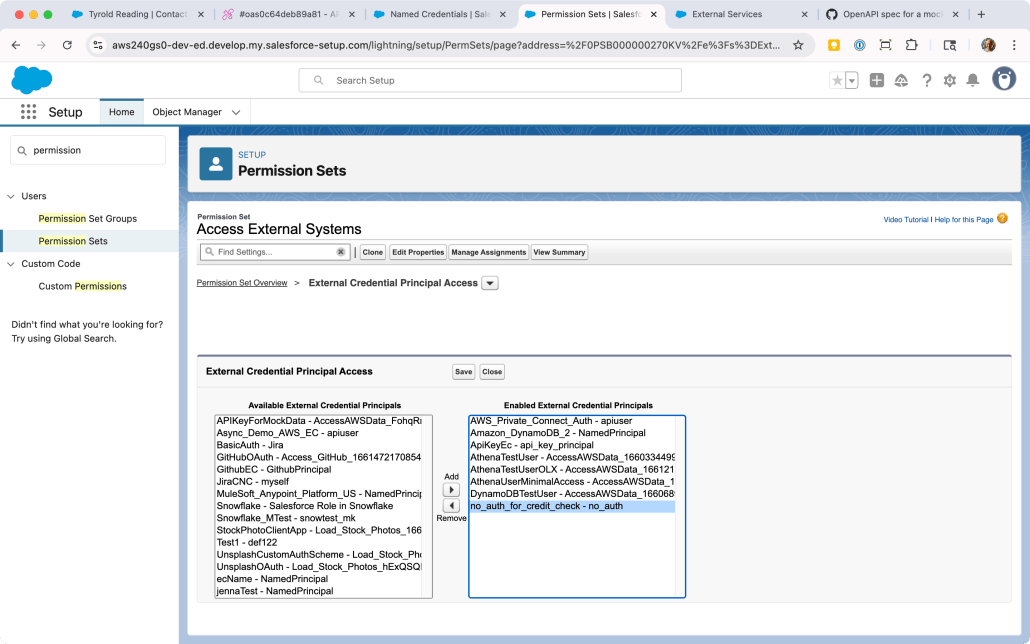
Locate a Permission Set already assigned to your user, or create a new one. Click into it, then scroll down to External Credential Principal Access and click that link.
You’ll be looking at a list of Principals that the users with this Permission Set can use in a callout. There may be no items in this list; either way, click Edit so we can add the new Principal.
The list on the left-hand side will contain all the External Credential Principals in the org. Find the one we just created (no_auth_for_credit_check - no_auth) and click the right arrow under Add to add it to the list. (Refer to the screenshot below for guidance.) Click Save.
To recap, what we’ve done is allow one or more users to make a callout using this credential. This is similar to how you need to grant access to Objects, Reports, Apex Classes, and other constructs in Salesforce.
You may have noticed we didn’t capture the URL in Salesforce yet. Let’s do that now by creating the Named Credential.
In Setup, go to Security > Named Credentials
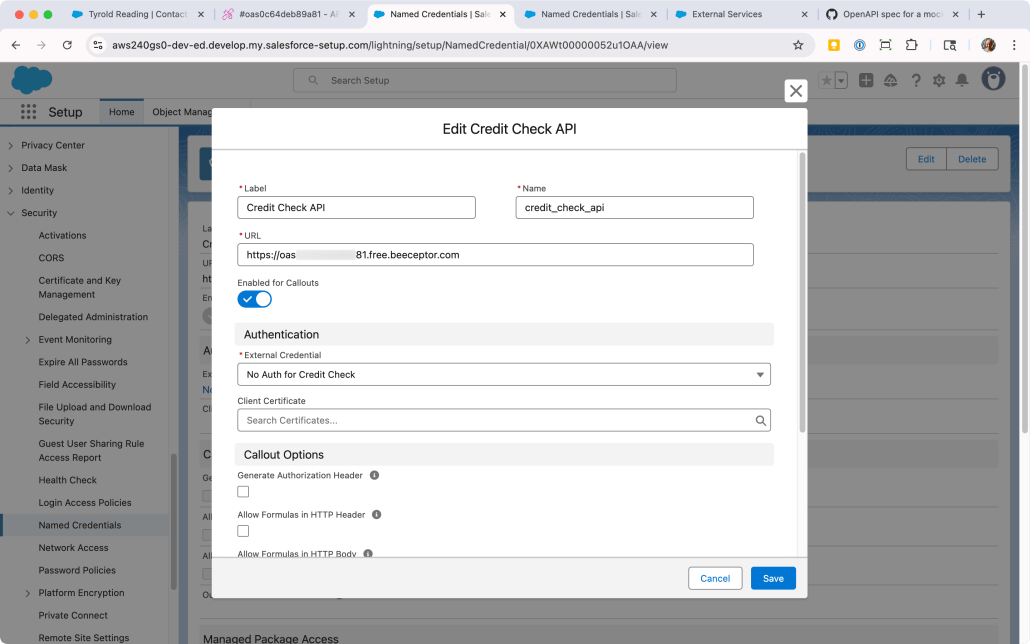
On the Named Credentials subtab, click New.
Fill in the details and click Save:
Label: Credit Check API
Name: credit_check_api
URL: Paste in the URL of the mock API from Beeceptor.
Scroll down to Principals and click New:
Fill in no_auth as the Parameter Name and click Save.
Finally! We now have the Named Credential configured with both the correct URL and the correct authentication options, and we’ve granted ourselves access to use it. With that in place, we can register the mock API as an External Service. This will enable us to use the API methods as Agent Actions.
In Setup, go to Integrations > External Services
Click Add an External Service
Choose From OpenAPI Specification and click Next.
Enter CreditAPI as the External Service Name and use the following as the Description: Returns the credit score and related information for a consumer identified by their National ID Number.
Under Service Schema, choose “Upload from local” and upload the OpenAPI specification you downloaded from GitHub (mock-openapi-spec.json).
Under Select a Named Credential, locate the credit_check_api credential you created previously.
Click Save & Next.
Click the checkbox next to the Operation column to multi-select both methods from the API. Click Next.
Review the new service and click Finish. You’ll see it added to the list of External Services.
Step 3: Add Custom Fields to the Contact Object
To make our scenario more realistic, we’ll add a custom fields to store the simulated credit information:
In Setup, go to Object Manager > Contact
Click Fields & Relationships > New
Create a field with the Label of National ID Number (Text, 20 characters).
Optionally, you can add it to the Page Layout or Lightning page.
For more on adding custom fields to objects, refer to this section of Salesforce Help. Technically, you can get the External Service and Agent to work without it.
Step 4: Create Agent Actions in Agentforce
Now, let’s make these API operations available to our AI agent:
In Setup, type Agentforce into the Quick Find and click Agentforce Assets.
Click on the Actions subtab and then New Agent Action.
Fill in the details for the first action and click Next:
Reference Action Type: API
Reference Action Category: External Services
Reference Action: Select Get Credit Score from the dropdown
Agent Action Label: Get Credit Score
Agent Action API Name: Get_Credit_Score
Enter Getting credit score in the Loading Text
Under the first Output, check the checkbox for Show in conversation.
Click Finish
Repeat steps 3-5 for a second action, with the following differences:
Reference Action: Select Get Credit History from the dropdown
Agent Action Label: Get Credit History
Agent Action API Name: Get_Credit_History
Loading text: Getting credit history
Step 5: Create a Topic for Credit Information
Now, you’ll create a topic that uses these actions. A complete description of Agentforce is beyond the scope of this post, so here’s some resources to refer to if you’re still getting familiar with Agent configuration:
This developer guide covers External Services and Agents, with a focus on MuleSoft
This blog post uses GitHub as an example, and also includes a video)
This trail on Trailhead leads you through an extensive example including Data Cloud and more
Since you’ve built the Agent Actions in the steps above, add both of them to a Topic just like any other Actions.
The description of the Actions is pre-populated from the API spec, so most of the Topic configuration amounts to instructing Agentforce to use these Actions when the user enters input like run a credit check.
Step 6: Test Your Integration
Time to see your new API integration in action:
Navigate to a Contact record in your Salesforce org
Make sure the Contact has a value in the National ID Number field (add something like “123-45-6789” if it’s empty)
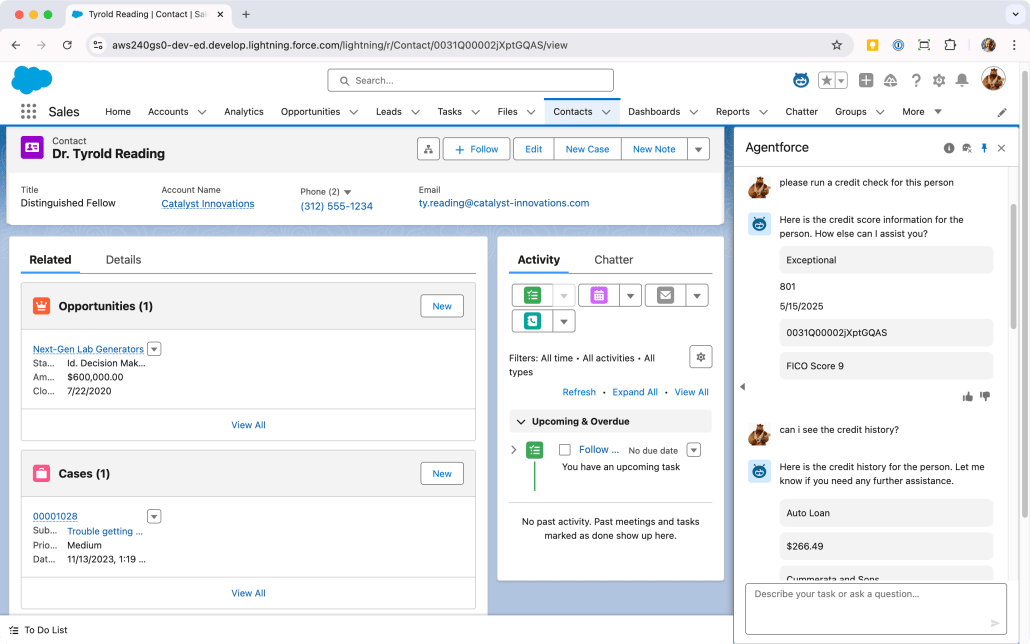
Click the Agentforce icon in the top right corner of the page to open the Agent UI in the side panel
Type a natural language request like…
“Run a credit check for this person”
“What’s this person’s credit score?”
“Check the credit history for this customer”
Sit back and watch as the Agent recognizes the intent and activates your Credit Check topic, retrieves the National ID when possible, calls the mock API to get simulated credit information, and presents the results in a conversational format. Whew!
Try different types of requests and see how the Agent handles them. You can also test what happens when you don’t have a National ID on the Contact; the Agent should ask you to provide one.
The Results: Understanding the Power of API Integration
After setting up our mock API integration, you’ve learned how your AI agents can:
Retrieve and use external API assets in real-time
Process that data intelligently to provide relevant insights
Maintain context between the external data and your Salesforce records
Deliver this information conversationally to users
All of this happens without any custom code or expensive development resources. The only thing left to do is figure out what to do with all the time you’ve saved. 🙂
Have you integrated external APIs with Agentforce? Share your experience in the comments below!
https://unofficialsf.com/wp-content/uploads/2022/09/largeUCSF-300x133.png00Ross Belmonthttps://unofficialsf.com/wp-content/uploads/2022/09/largeUCSF-300x133.pngRoss Belmont2025-05-16 16:35:332025-05-16 16:35:36Agentforce and External Services: A No-Code API Integration Guide