
Turn Invocable Flow Actions into Reactive Screen Components
Created by Eric Smith
This Post was most recently updated on: 4/27/25
Current Version: 1.0.4

Invocable Flow Actions are a great way to use specialized code to add declarative building blocks to your Flows. They can take one or more inputs, perform some background processing, and then return one or more outputs back to your Flow. There are a bunch of standard actions available in the Flow Builder such as Send an Email, Post to Chatter, Submit for Approval along with many custom actions available on the AppExchange and here on unofficialsf.com.
Flow Screen Components can be used to collect user input as well as to organize and display information on the flow screen. Standard screen components are used to do things like upload files, input text, numbers, emails, urls, etc along with a display text component to show formatted information. Custom screen components provide additional capabilities like drawing a line, displaying a datatable with inline editing, adding custom buttons, dependent lookups, copying to clipboard, inputting rich text, and many more.
Until recently, the typical way many Screen Flows were designed was to present a screen to collect user input and move to the next step once the user clicked the Next button. After the screen, the flow could access the data from the screen and draw on standard and custom actions to do some processing before displaying another screen with the results of that processing.
Now, with the ability to have individual screen components react to the outputs of other components on the same screen, we can build interactive flows that reduce click fatigue by keeping much of the input, processing and display on a single screen. I think these single screen flows will be a big part of building immersive applications in the future.
The key to doing all of this is being able to move specialized processing out of the Flow Canvas and onto the Flow Screen. There is a great example of this already with the AppExchange DataFetcher component that can execute a SOQL query based on values provided by the user and pass the results to another component, like a datatable, all on a single interactive and reactive screen.
I’ve come across multiple use cases where I wanted to take the capability of an invocable action and move that onto a reactive screen to do things like sort, filter, extract, calculate, compare and more all on the fly. Many of these invocable actions are part of a package of Collection Processors available here on unofficialsf.com. The actions I’ve converted so far include:
- Calculate Field Summary
- Extract Field to Collection
- Filter Collection
- Find Common and Unique Records
- Get First Record
- Join Collections
- Sort Collection
- Upsert Record By Key
Unique Reactive Collection Processors
Most of these actions are reactive versions of the unofficialsf.com Collection Processors. Two new unique actions have been added to improve the performance of reactive flow screens.
For certain types of reactive screens, some components are designed to react to the outputs of other components on the same screen. However, the first time a screen loads, these components may not have a value available. The Reactive Record and Reactive Record Collection components are designed to “seed” a component with a starting value before it can react to a change in another component. Think of these like the flow formula function BLANKVALUE where you can assign an optional value to use if the primary value is null or blank.
Reactive Record
Seed a reactive screen component with an alternate record when the screen loads, then on subsequent reactive refreshes of the component, the primary record is used.
| INPUTS | ||
| Input Record | The record to be used unless it’s empty | SObject |
| Alternate Record | The record to be used if the Input Record is empty | SObject |
| OUTPUTS | ||
| Output Record | The input record or if it is empty, the alternate record. | SObject |
| error | Error message when there is an error output from this component | String |
Reactive Record Collection
Seed a reactive screen component with an alternate record collection when the screen loads, then on subsequent reactive refreshes of the component, the primary record collection is used.
| INPUTS | ||
| Input Record Collection | The record collection to be used unless it’s empty | SObject Collection |
| Alternate Record Collection | The record collection to be used if the Input Record is empty | SObject Collection |
| OUTPUTS | ||
| Output Record Collection | The input record collection or if it is empty, the alternate record collection . | SObject Collection |
| error | Error message when there is an error output from this component | String |
Use Cases
There are many possible use cases for Reactive Collection Processors on a Flow Screen. Here are just a few.
- Datatable Summary Calculations
- Use Custom Metadata to Build Dependent Picklists
- Apply Datatable edited rows collection to the original collection
- Reactive picklist based on multi-select choices
- Use a Datatable Row Action to Launch a Screen Flow
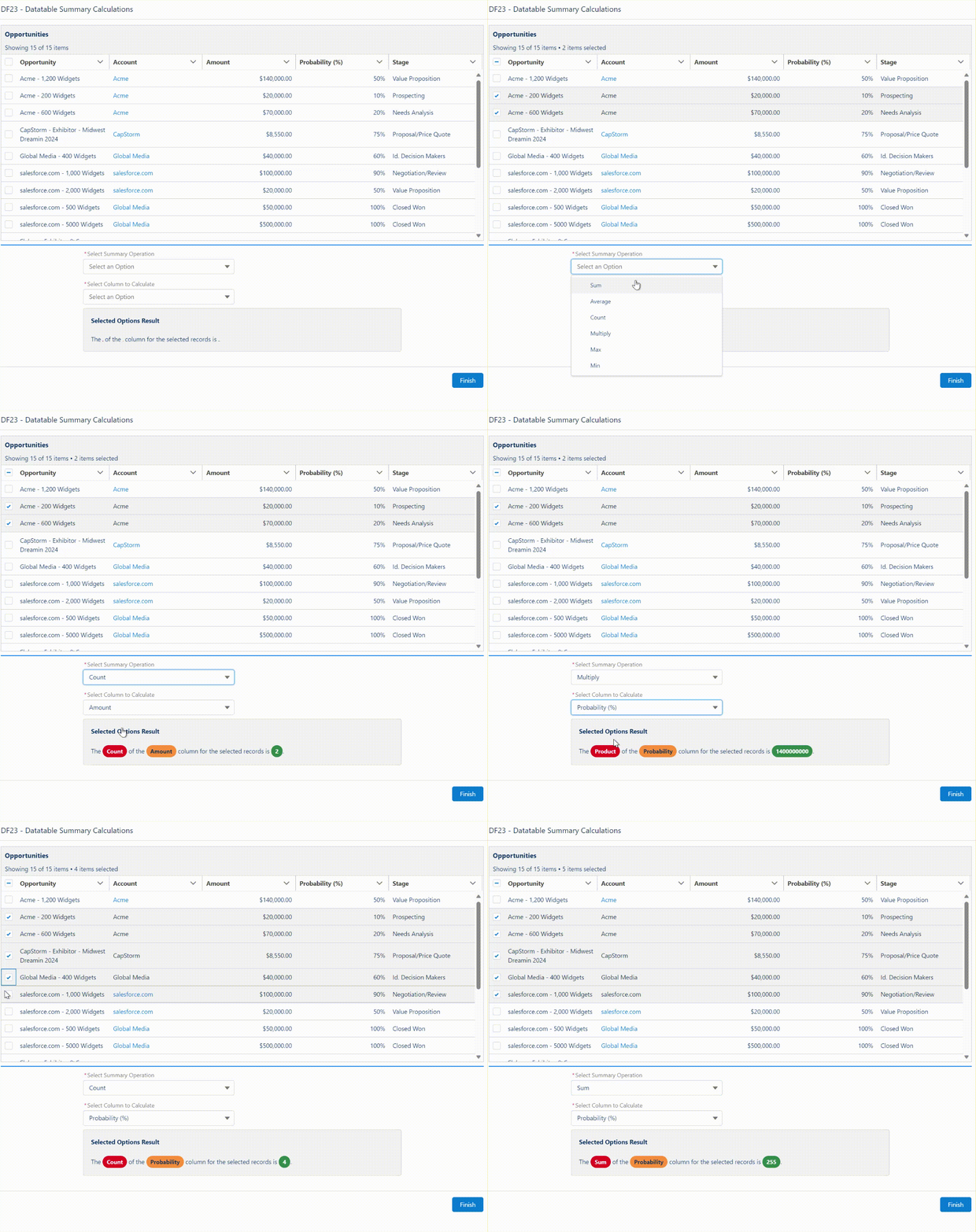
One use case involves displaying a collection of records in a datatable and showing a subtotal summary below the table based on only the records the user selects in the datatable. The results change on the fly as the user selects and deselects various records. The solution uses a reactive screen version of the Collection Calculate invocable action.

Another use case presents a series of picklist selections where the options shown for each picklist are dependent on the prior selections made by the user. This solution uses a collection of custom metadata records to define the dependencies. The DataFetcher action queries the CMDT based on the user’s selections, then a reactive screen version of the Extract Strings from a Collection action processes the output from the DataFetcher and sends back a deduped text collection of values from the CMDT to pass into a QuickChoice component to display the next set of picklist values.


10/22/23 – New Use Case
NOTE: As of v4.3.0 of Datatable, a new output attribute (OutputRemainingRows) will include all of the original records with any saved edits applied.
My Datatable component for flow screens allows for inline editing of field values. The component will return a collection of just the edited records, with the changes included. Often times an admin may want to build a flow where, prior to committing records to the database, they want to display or otherwise use a collection of records that includes all of the records originally displayed in the Datatable but have the records include the edits made by the user. We can do this by comparing the original record collection with the edited record collection output from the Datatable and identifying which records are in the original collection but not in the edited record collection (Find Common and Uncommon Records). We can then Join that collection of unique records from the original collection with the edited record collection from the Datatable to have a complete collection of records that includes the edited values. (Join Collections). Finally we can Sort that collection of records to match the original record sequence. (Sort Collection). With these new Reactive Screen Components, we can do all of that processing without ever leaving the Flow Screen.


12/14/23 – New Use Case
Flownastic girl was looking for a way to to have a picklist field on a screen show only the values selected in a multi-select picklist from the same screen. To do this reactively, I created a new screen component to call the Convert Strings to/from String Collections action. You can install all of the Collection Processors as a single package. In this example I show how either a Checkbox Group component or a Multi-Select Picklist field can be used to populate the selections in the Quick Choice component.
1/5/25 – Use a Datatable Row Action to Launch a Screen Flow
This use case shows how a pop-up screen flow can be used to edit Lookup and/or Multi-Select Picklist fields.
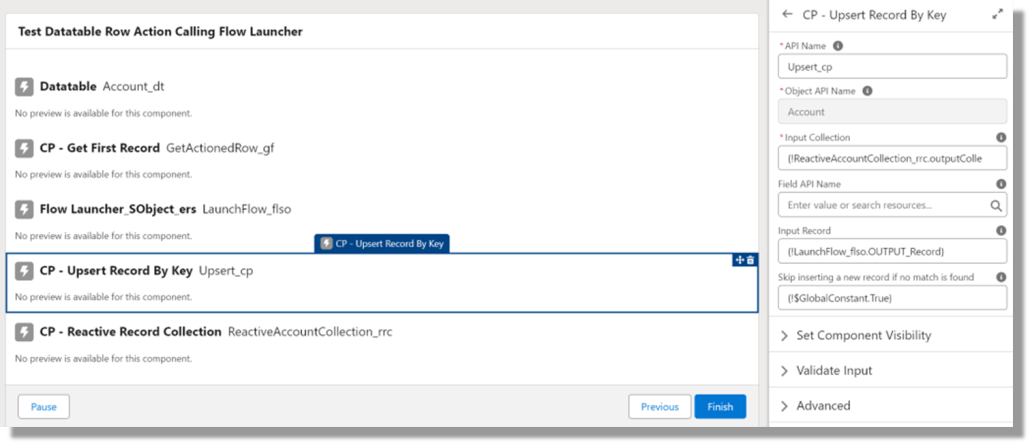
The Datatable Row Action triggers a Screen Flow Launcher that loads a Field Update Screen Flow whose output triggers an Upsert Action to upsert the changed record back into the original collection which is then reactively redisplayed in the Datatable.
Get complete details on how to build this type of flow here.
I’ve come up with a generalized method to actually make an existing Invocable Action available to a Flow as a Reactive Screen Component. Feel free to skip the technical details in the next section unless you are curious as to how this is done.
This is all possible because:
- Flow Screen Components can be created with Lightning Web Component (LWC) code.
- LWCs can call AuraEnabled Apex methods (Controllers)
- Apex controllers can call other Apex components
- Invocable Actions are created with Apex code and they can be called by other Apex code.
I’ve created the various components required to do this as a fully commented template that takes you through all the steps needed to build each of the pieces that ties all of this together.
Lightning Web Component
- Expose to a flow screen
- Duplicate all of the input and output attributes used by the Invocable Action
- Provide any default attribute values if needed
- Track all attributes that need to be reactive and pass changes back to the flow
- Display an optional error message
- Call the AuraEnabled Apex Controller that will interact with the Invocable Action
- Pass the results back to the flow
Apex Controller
- Define each of the attributes to be passed into this controller by the LWC and then passed to the Invocable Action
- Define each of the attributes to be returned by the Invocable Action and then passed back to the LWC
- Execute the Invocable Action
- Handle conversions of attribute types
- Return the results back to the LWC
Apex Controller Test Class
- Add tests to exercise the various capabilities of the Invocable Action
- Add tests to generate exceptions
Available Collection Processor Reactive Screen Components

Installation
Production or Developer Version 1.0.4
Sandbox Version 1.0.4
This version requires v3.2.4 or later of the Collection Processors package. (Released 1/5/25)
Release Notes
4/27/25 – Eric Smith – v1.0.4
Allow starting collection to be empty in CP – Upsert Record By Key
1/5/25 – Eric Smith – v1.0.3
This version requires v3.2.4 or later of the Collection Processors package. (Released 1/5/25)
Added the following reactive actions:
- Get First
- Upsert Record By Key
- Reactive Record
- Reactive Record Collection
12/14/23 – Eric Smith – v1.0.2
Added the following action:
10/22/23 – Eric Smith – v1.0.1
Added the following actions:
9/5/23 – Eric Smith – v1.0
Includes the following actions:
Previous Versions
Production or Developer Version 1.0.2
Sandbox Version 1.0.2
Production or Developer Version 1.0.1
Sandbox Version 1.0.1
Production or Developer Version 1.0.0
Sandbox Version 1.0.0
View Source

