This detailed blog post from Salesforce shows how to use a specification created using the Open API Spec to generate Flow Action via External Services. So far, that’s not really new. But then the authors show how you can create a Heroku-based implementation of that API using Node.js. Finally, they show how platform events can be used to communicate effectively from Heroku back to a triggered flow.
At the bottom of the screen you’ll find a new commenting system. Opinions welcome….
https://unofficialsf.com/wp-content/uploads/2022/09/largeUCSF-300x133.png00Alex Edelsteinhttps://unofficialsf.com/wp-content/uploads/2022/09/largeUCSF-300x133.pngAlex Edelstein2020-10-25 17:58:172020-10-25 17:58:18We’re trying a new Comment extension. How do you like it?
I wanted to invite anyone in the Flowhana who can write some code to participate in a couple of team efforts that are spinning up.
On the Apex side, we want to extend the Process Builder Converter tool. Current work items include adding support for PB processes that couldn’t be converted in Summer ’20 but can be converted in Winter ’21 (example, if you use a related object reference), and implementing the first conversion support for Workflow Rules.
On the Lightning Web Components side, we’re creating a new screen component called a Flexcard.
You don’t have to be an expert coder to contribute to these projects. In fact, one of the coolest things about UnofficialSF is watching noncoders become coders, beginner coders become intermediate coders, and intermediate coders build advanced skills. I’d say that the basic prerequisites are:
you need to have successfully built either a flow invocable action or a flow lwc screen component.
you need to understand git reasonably well (up through section 3.5 of this book)
As long as you’re willing to be responsive to code reviews and are reasonably diligent about trying to write clear code, you’re very welcome.
You also don’t have to worry that you’re making a big commitment. First of all, the work is divided into reasonably sized stories, and if you find yourself getting in too deep, don’t worry that you’ll leave others annoyed. This is hobbyist stuff and it needs to be fun and satisfying or it’s not worth doing.
Interested? Drop a comment below and we’ll get in touch.
https://unofficialsf.com/wp-content/uploads/2022/09/largeUCSF-300x133.png00Alex Edelsteinhttps://unofficialsf.com/wp-content/uploads/2022/09/largeUCSF-300x133.pngAlex Edelstein2020-10-25 17:57:222020-10-25 17:57:23Chance for Glory 3: Contribute to Two Cool New Flow Extensions: ProcessBuilderAndWorkflowRulesConverter and Flexcards
These reusable libraries of useful actions and components are generally used by other, more specific Flow tools.
There will be one for Actions and one for ScreenComponents. This is being done because there are really good reasons to put the Actions in a Managed Package but it’s currently impossible to create libraries of LWC’s in Managed Packages and access those LWC’s from an LWC that isn’t in the same namespace. Splitting them up does the trick.
FlowActionsBasePack
FlowActionsBasePack is a managed package. This makes it easier to install (details below).
FlowScreenComponentsBasePack is an unlocked package. This is necessary because Lightning Web Components can’t use custom libraries yet if they’re managed (and thus have their own namespace)..
FlowScreenComponents BasePack requires the presence of FlowActions BasePack, because some of the screen components inside of it rely on Apex classes that are included in FlowActions BasePack. So you’ll need to install FlowActions BasePack first.
There is an older FlowBaseComponents that is now obsolete, and we do not recommend the use of it as a prerequisite in new development. The existing FlowBaseComponents package version 1.3.4 will remain available for use with components that require it. We’re going to be encouraging extension developers to make use of these new base packs, going forward, and don’t plan to enhance FlowBaseComponents
Going forward, we’re breaking FlowBaseComponents into two packages:
https://unofficialsf.com/wp-content/uploads/2022/09/largeUCSF-300x133.png00Tamar Erlichhttps://unofficialsf.com/wp-content/uploads/2022/09/largeUCSF-300x133.pngTamar Erlich2020-10-23 06:47:492020-10-26 04:40:08Salesforce Record Automation Benchmarking by Luke Freeland
Over on my new blog Declarative Ninja I’ve made a video on on how I built a dataloader ‘on guardrails’ where you can take a CSV file and perform mass DML in a controlled environment via Flow.
https://unofficialsf.com/wp-content/uploads/2022/09/largeUCSF-300x133.png00Adam Whitehttps://unofficialsf.com/wp-content/uploads/2022/09/largeUCSF-300x133.pngAdam White2020-10-21 16:50:092020-10-21 16:50:11From Adam White – Making a Dataloader on Guardrails in Flow: Featuring Mass Transactor
https://unofficialsf.com/wp-content/uploads/2022/09/largeUCSF-300x133.png00Tamar Erlichhttps://unofficialsf.com/wp-content/uploads/2022/09/largeUCSF-300x133.pngTamar Erlich2020-10-16 12:49:182020-10-18 12:02:33Use Flows to Track Unread Emails on Cases and Increase Case Management Efficiency by Vibhor Goel
I was recently tasked with a requirement to display a list of opportunity partners on a custom object related to opportunity. I planned to use a flow to get the opportunity partner records and then display them using the Datatablev2 Flow Screen Component available on this site. When I tried to create the flow, I encountered some issues: 1. The Opportunity Partners object is a legacy object and cannot be customized. I could not create formulas for getting the account name or link to the account 2. I could not use dot notation to get the account name from the account ID in the get records component in the flow 3. I could not use the partner account ID as a filter criteria on a new get records element to get the account records.
Not Possible
I knew I had to create a custom way to get the data I needed to display. Eric Smith referred me to his blog post on how to use Apex defined data types and an invocable action to create data for the datatable component. How to Use an Apex-Defined Object with my Datatable Flow Component I create my Apex defined data type for opportunity partners.
/**
* @author       : Tamar Erlich
* @date         : October 07, 2020
* @description  : Wrapper class for opportunity partners
* Note          : This class is called by the GetOpportunityPartnersAction.
* *************************************************
*       <runTest><runTest>
* *************************************************
* @History
* -------
* VERSION | AUTHOR                | DATE               | DESCRIPTION
* 1.0     | Tamar Erlich          | October 07, 2020   | Created
**/
public with sharing class OpportunityPartnersWrapper {

    // @AuraEnabled annotation exposes the methods to Lightning Components and Flows
    @AuraEnabled
    public String accountName;

    @AuraEnabled
    public String partnerRole;

    @AuraEnabled
    public Boolean isPrimary;

    @AuraEnabled
    public String accountLink;

    // Define the structure of the Apex-Defined Variable
    public OpportunityPartnersWrapper(
            String accountName,
            String partnerRole,
            Boolean isPrimary,
            String accountLink
    ) {
        this.accountName = accountName;
        this.partnerRole = partnerRole;
        this.isPrimary = isPrimary;
        this.accountLink = accountLink;
    }

    // Required no-argument constructor
    public OpportunityPartnersWrapper() {}

}
I then created an invocable action that received the opportunity and account IDs and returns a JSON string that can be displayed in my flow table.
/**
 * @author       : Tamar Erlich
 * @date         : October 07, 2020
 * @description  : Invocable method that given opportunityId and accountId, returns a list of opportunity partners to display on opportunity plan record page
 * Note          : This class is called by the Flow.
 * *************************************************
 *       <runTest>GetOpportunityPartnersActionTest<runTest>
 * *************************************************
 * @History
 * -------
 * VERSION | AUTHOR                | DATE               | DESCRIPTION
 * 1.0     | Tamar Erlich          | October 07, 2020   | Created
 **/
global with sharing class GetOpportunityPartnersAction {
  // Expose this Action to the Flow
  @InvocableMethod
  global static List<Results> get(List<Requests> requestList) {
    // initialize variables
    Results response = new Results();
    List<Results> responseWrapper = new List<Results>();
    String errors;
    String success = 'true';
    String stringOutput;
    List<OpportunityPartner> opportunityPartners = new List<OpportunityPartner>();
    List<OpportunityPartnersWrapper> opportunityPartnersSet = new List<OpportunityPartnersWrapper>();
    Set<Id> setOppIds = new Set<Id>();
    Set<Id> setAccIDs = new Set<Id>();
    Map<Id, List<OpportunityPartner>> mapOppOppPartners = new Map<Id, List<OpportunityPartner>>();

    // create sets of Ids to use as bind variables in the query
    for (Requests rq : requestList) {
      setOppIds.add(rq.opportunityId);
      setAccIds.add(rq.accountId);
    }

    // query all request opportunities and their partners and create a map with opportunityId as the key and a list of parrtners as the values
    for (Opportunity opp : [
      SELECT
        Id,
        (
          SELECT AccountTo.Name, IsPrimary, Role
          FROM OpportunityPartnersFrom
          WHERE OpportunityId = :setOppIds AND AccountToId != :setAccIds
        )
      FROM Opportunity
    ]) {
      mapOppOppPartners.put(opp.Id, opp.OpportunityPartnersFrom);
    }

    for (Requests curRequest : requestList) {
      String accountId = curRequest.accountId;
      String opportunityId = curRequest.opportunityId;

      try {
        if (accountId == null || opportunityId == null) {
          throw new InvocableActionException(
            'When using the GetOpportunityPartners action, you need to provide BOTH an Account Id AND an Opportunity Id'
          );
        }

        if (!accountId.startsWith('001') || !opportunityId.startsWith('006')) {
          throw new InvocableActionException(
            'Invalid Account or Opportunity ID'
          );
        }
        // get the list of opportunity partners matching the current opportunityId from the map
        if (accountId != null && opportunityId != null) {
          opportunityPartners = mapOppOppPartners.get(opportunityId);
        }

        // populate the Apex defined wrapper type with opportunity partner information
        for (opportunityPartner op : opportunityPartners) {
          OpportunityPartnersWrapper opw = new OpportunityPartnersWrapper();

          opw.accountName = op.AccountTo.Name;
          opw.partnerRole = op.Role;
          opw.isPrimary = op.IsPrimary;
          opw.accountLink = '/' + op.AccountToId;

          opportunityPartnersSet.add(opw);
        }

        // Convert Record Collection to Serialized String
        stringOutput = JSON.serialize(opportunityPartnersSet);
      } catch (InvocableActionException e) {
        System.debug('exception occured: ' + e.getMessage());

        errors = e.getMessage();
        success = 'false - custom exception occured';
      } catch (exception ex) {
        System.debug('exception occured: ' + ex.getMessage());

        errors = ex.getMessage();
        success = 'false - exception occured';
      }

      // Prepare the response to send back to the Flow
      // Set Output Values
      response.errors = errors;
      response.successful = success;
      response.outputCollection = opportunityPartnersSet;
      response.outputString = stringOutput;

      responseWrapper.add(response);
    }

    // Return values back to the Flow
    return responseWrapper;
  }

  // Attributes passed in from the Flow
  global class Requests {
    @InvocableVariable(label='Input the Related OpportunityId' required=true)
    global String opportunityId;

    @InvocableVariable(label='Input the Opportunity\'s AccountId' required=true)
    global String accountId;
  }

  // Attributes passed back to the Flow
  global class Results {
    @InvocableVariable
    global String errors;

    @InvocableVariable
    global String successful;

    @InvocableVariable
    public List<OpportunityPartnersWrapper> outputCollection;

    @InvocableVariable
    public String outputString;
  }

  // custom exception class
  global class InvocableActionException extends Exception {
  }
}
/**
* @author       : Tamar Erlich
* @date         : October 07, 2020
* @description  : Test class for GetOpportunityPartnersAction Invocable method
* Note          :
* *************************************************
*       <runTest>GetOpportunityPartnersActionTest<runTest>
* *************************************************
* @History
* -------
* VERSION | AUTHOR                | DATE               | DESCRIPTION
* 1.0     | Tamar Erlich          | October 07, 2020   | created
**/
@IsTest
public with sharing class GetOpportunityPartnersActionTest {


    @isTest
    public static void opportunityPartnersFound(){

        // initialize variables
        List<GetOpportunityPartnersAction.Requests> requestList = new List<GetOpportunityPartnersAction.Requests>();
        String accountId;
        String opportunityId;

        // create test account
        List<Account> accounts = new List<Account>();

        for (Integer j = 0; j < 1; j++) {

            Account a = new Account(
                Name = 'email' + j + '.com'
                );

            accounts.add(a);
        }

        insert accounts;

        // create test opportunity
        Date closeDate = System.today();
        Opportunity testOpp;

        testOpp = new Opportunity(
            Name = 'test opp',
            StageName = 'Open In-Progress',
            Amount = 100,
            CloseDate = closeDate
        );
        insert testOpp;

        accountId = accounts[0].Id;
        opportunityId = testOpp.Id;

        // create test opportunity partner
        OpportunityPartner testPartner;
        testPartner = new OpportunityPartner(
            OpportunityId = opportunityId,
            AccountToId = accountId,
            Role = 'Dealer',
            IsPrimary = false
        );
        insert testPartner;

        // prepare request for GetOpportunityPartnersAction
        GetOpportunityPartnersAction.Requests request = new GetOpportunityPartnersAction.Requests();
        request.accountId = accountId;
        request.opportunityId = opportunityId;
        requestList.add(request);

        // run test and assert results
        List <GetOpportunityPartnersAction.Results> results = GetOpportunityPartnersAction.get(requestList);
        System.assertEquals(results[0].errors, null,'Errors not expected');
        System.assertNotEquals(results[0].successful, 'false', 'Success expected');
        System.assertEquals(true, results[0].outputCollection.size()>0, 'Opportunity Partners expected');
    }

}
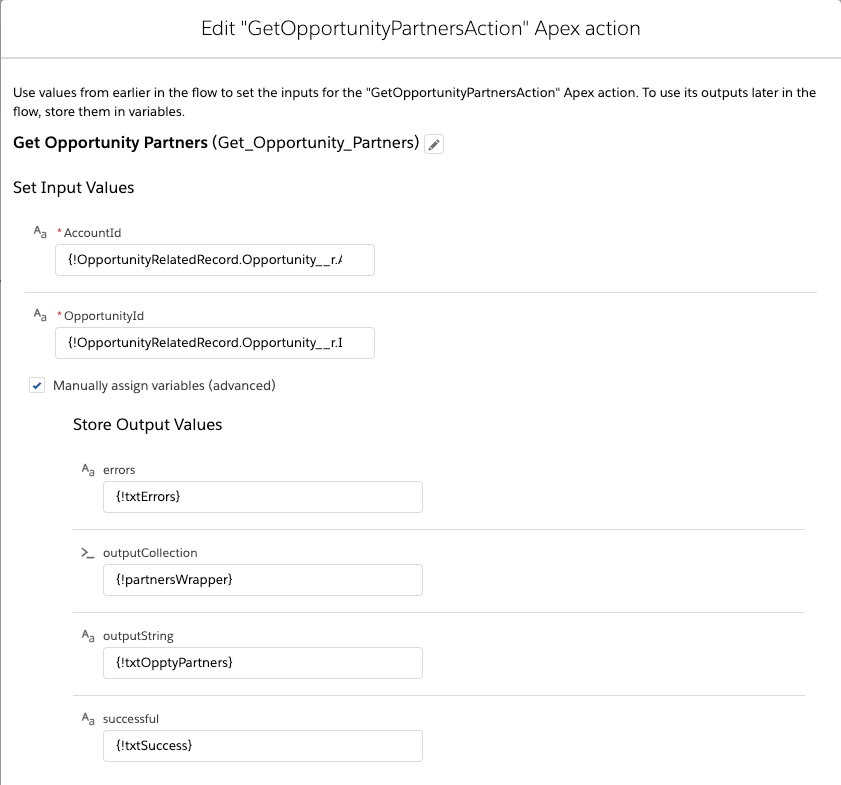
I then used my new action in the flow to get the opportunity partner records.
Invocable action
I then configured my datatable on the flow screen
Flow Screen
Some notes on the datatable configuration: 1. User Defined had to bet set to true 2. The Datatable Record String must be set to the variable returned from the action 3. The column field types must be set for all columns. I set the first column to the url type 4. My first column has special type attributes for displaying as a clickable link: 1:{label: { fieldName: accountName}, target: ‘_blank’} 5. Since this is for display only, I hid the checkbox columns 6. I used the new features available in v2.46 to apply an icon and title to the table
The View All link uses a formula to create the link
View All Formula
Here is the entire flow
And here is the end result
Opportunity Partners on custom object
This use case can be easily adapted to display other opportunity related information like opportunity team members or opportunity contact roles.
https://unofficialsf.com/wp-content/uploads/2022/09/largeUCSF-300x133.png00Alex Edelsteinhttps://unofficialsf.com/wp-content/uploads/2022/09/largeUCSF-300x133.pngAlex Edelstein2020-10-13 09:55:212020-10-13 09:55:2225 New Flow Exercises from SalesforceFlowLab