

From Tim Combridge & Salesforce Ben: An Orchestrator Overview
Another nice overview:

From Andy Schmiechen: An Introduction to Salesforce Orchestrator Webinar
Andy recently made this great presentation. It’s one of the first videos that uses the Winter ’22 Beta version, and it’s well worth watching.
Note that because Orchestrator is in Beta now, everyone can try it out. It will be a paid product, but all orgs will get a freemium allowance.
Official Orchestrator Help Is Now Online
The Beta version of Orchestrator hits this week. Here are the docs:

Other Orchestration information available here.
Flow Orchestration Use Case – approve user provisioning
I was eager to test the new flow orchestrator and found a use case to try. When a user submits a case to be provisioned as a partner user, we need to process two manager approvals and then provision the contact and the user under the partner account. I built an orchestration to complete the approvals and then provision the user

I used the tutorials provided here by Alex to build this. The overall design uses three flows that share data using input and output variables.

My starting conditions were based on case creation

The manager approval is routed to the approving manager lookup field from the case

The supervisor approval is routed to a specified username

My approval flow is very simple and includes just one screen. It outputs the approval, and some user data from the case, that will be consumed by the provisioning flow. I used some interesting formulas to parse the supplied Web Name from the case to a first name and a last name, and since only variables can be designated for output, I’m assigning my formulas as the default value of the output variable


Here is how the approval request screen looks to the approving manager

Next, I created an autolaunched flow that evaluates both approvals and outputs the special “isOrchestrationConditionMet” boolean value that tells the next step to start. This flow also updated the final approval status on the case record.


Then my provisioning flow will start and show as a work item to the case owner


Here is how the provisioning screen looks to the user. The first name, last name, email, and account name, are populated from the approval flow and case record data.

In this screen I’m using the Quick Lookup flow screen component to dynamically filter the user role list based on the selected partner account

And after the provisioning is complete, the flow shows the success scree

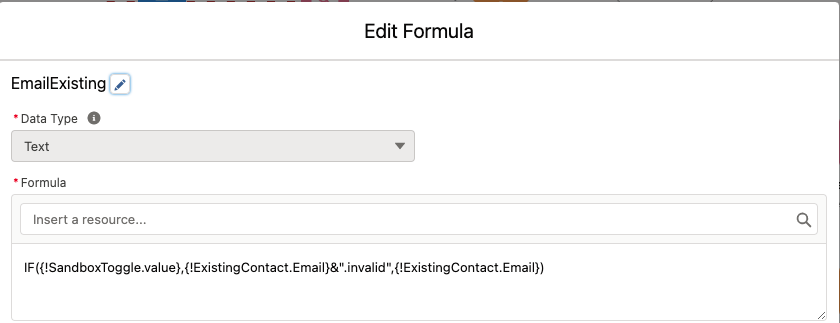
I used some special formulas to set the alias, email, nickname, and username for the new user.
To avoid a mixed DML error, I used the Commit Transaction action between creating the contact and creating the user.



When the orchestration completed, I was able to view all the completed stages, and steps in the flow orchestration instance history

Overall, building this orchestration was fun and easy. I can see how powerful this tool can be for handling complex processes. I would like to be able send an approval request to non Salesforce users, that can approve by replying to the email, or by going to the work item component publicly exposed on a community page.
I’m looking forward to seeing how this tool will evolve and to all the enhancements that will be made.
New Orchestrator Expert Corner Video with 5 Minute Demo of the Winter Beta
Antoine is the product manager in charge of the new Flow Orchestrator. Check it out!

Winter ’22 Sneak Preview for Salesforce Orchestrator
Orchestrator will go beta in Winter ’22. As a reminder, this is the home page for Orchestrator.
Here are the notable improvements in Winter ’22 for Orchestrator. To see the Winter ’22 preview for Flow, go here.
Background Steps enable Autolaunched Flows to be integrated into orchestrations
Background Steps are simple steps that don’t involve assignees. These steps essentially represent a single Autolaunched flow.

Orchestrations can loop back to repeat earlier stages
This functionality leverages the new ‘Go To’ connectors in Auto-Layout Mode

Orchestrations can be packaged
When you add an Orchestration Flow to a package, it will spider in the rest of the Orchestration’s metadata. It also properly adjusts for assignees, which were breaking cross-org packages.
Orchestrations support Manual Variables, Input Variables and Output Variables
You can now define manual variables in an Orchestration flow, just as in other flows, and configure them to be exposed to receive inputs or provide outputs.
Orchestrator Instance Records Available in Flow Builder
Orchestrator in Winter ’22 is lacking in tools to show the status of running orchestrations, but that temporary gap is already getting filled by the community, which can leverage the ability to query for all three of the core Orchestrator instance objects: Orchestration Instances, Orchestration Stage Instances, and Orchestration Step Instances
