
Send Richer Email with the ‘Send Better Email’ Flow Action
Send Better Email is the latest and best email action for Flow, replacing previous versions of Send Rich Email and Send HTML Email.
It provides easy access to Salesforce’s single and mass email services, taking the place of Flow’s built-in Send Email action, which is currently something of an underachiever.
Features
This flow action supports:
- Rich HTML email bodies that can use all of the capabilities of Flow’s Text Templates, including Bold, Italics, Underline, Bullets and Numbers, Left/Center/Right justification, URLs, images, fonts, and text size
- Email Templates (both Classic and Lightning) with field merge and letterheads
- Any combination of the following input sources, for To, CC, and BCC
- A single email address
- A string collection of email addresses
- A collection of Contacts
- A collection of Users
- A collection of Leads
- Organization-Wide Email Addresses
- Attachments
- Ability to toggle on/off the use of the Salesforce per-user email signature
- Ability to provide a plain text body, an html body, or both
- Ability to set the ReplyTo email address and the Sender Display Name
- Multi-Language Support for Lightning Email Templates
- Bulk Email (for advanced use and users)
In addition, this action provides access to Salesforce’s Mass Email services. These don’t provide as much configurability but allow for greater manageability and throughput.
Currently unsupported features include:
- Character Set setting
If you’re interested in extending this class, please do so!
- Video introduction (This is old and doesn’t reflect the current UI, but still has useful guidance on how to use the features)
- Installation
Usage Notes
This Action greatly expands the range of what you can do with Flow and email, but keep in mind that Flow is not optimized to serve as a mass email marketing solution. Despite the range of options provided here, you may hit system limits. Consider Marketing Cloud for large volumes and specialized needs.
NOTE: Scratch/Sandbox/Development orgs have very limited volume and recipient restrictions (example, scratch orgs have strict cutoff after sending just 50 email messages) and may allow as few as 10 external email addresses per day. Your production org will vary significantly, and issues related to limits in development do not necessarily correlate with production environments.
Configuration
Salesforce provides two kinds of email service, referred to here as Single Message and Mass Message modes.

In a nutshell:
- Standard Email – The preferred choice. When in doubt, select this option. It provides far more powerful customization options for recipient selection (including the use of standalone text email addresses), message formatting, and more. However, this mode limits the number of recipients (150) per message and the number of different messages per invocation (10) you can use.
- Mass Email – If you’re sending the same message to many recipients of the same object type (e.g., contacts, leads, or users), and you’re comfortable being required to use an email template, this mode provides you with greater throughput.
You can change between the two, but the parameters are very different, so changing the mode is almost a complete “configuration from scratch” process.
Sender Settings
These parameters are related to the sender of the message.

You can either 1) use an OrganizationWideEmailAddress or 2) specify your own Reply-To Email Address and Sender Display Name. If you provide an OrganizationWideEmailAddress, that will take precedence and any Reply-To Email Address and/or Sender Display Name you’ve also provided will be ignored.
Sender Display Name
Optional. The name that appears on the From line of the email. Don’t attempt to set this if you’re also using an Organization-Wide Email Address with a defined DisplayName field.
NOTE: By default, the message will usually appear to be coming from (Example): noreply@salesforce.com; on behalf of; Do Not Reply <donotreply.example.com> . Changing this involves your email domain settings, outside of Salesforce.
Organization Wide Email Address
Optional. The ID of the organization-wide email address associated with the outgoing email.
- Note: The object’s DisplayName field cannot be set if the Sender Display Name field is already set.
- Note: you cannot use Organization-Wide Email Address together with Reply Email Address.
To use an Organization-Wide Email Address , pass the Id of one that you have defined into the action via the “Use This Organization-Wide Email Address Id”. (If you want to get the benefit of Verified sending, you can’t just paste the email address into the Reply-To Email Address field. You have to use the Use This Organization-Wide Email Address Id field.). You can locate the ID in the URL of an Organization-Wide Email Address (it starts with ‘0D2’):

Sender receives BCC of first email sent?
If selected, the user running the Flow receives a copy of each email that is sent.
Reply Email Address
Optional. The email address that receives the message when a recipient replies. Can not be used at the same time as an Organization-Wide Email Address.
Use Salesforce Signature if executing user has one?
Each Salesforce user can set up their own signature in their personal settings:

If this checkbox is set, the user’s signature will be appended to the bottom of the email. The default is now false, as of version 2.0.4. Previously it defaulted to true.
MessageId List of existing email if this is InReplyTo
Sets the optional In-Reply-To field of the outgoing email. This field identifies the email or emails to which this email is a reply (parent emails). This is a collection of strings which are joined to populate the In-Reply-To field in the message header. Example:
In-Reply-To: <Fbg5P000000000000000000000000000000000000000000000QOMSGC00gRACvieGTKiHyEKz5Cywdw@sfdc.net>
Set Addressees
You can use the following data sources:
- A single text email address
- A string collection of email addresses
- A collection of Contacts
- A collection of Users
- A collection of Leads

To simply type in a text value, select “String Variables (or type an address)” in the Search existing Flow resources, type the value you want to use, and click Search

Subject and Body
You can directly configure the subject and body or alternatively use a Lightning or Classic Email Template.

Subject
NOTE: If you manually specify a Subject and select Use Email Template, your specified subject value will override the Template’s specified Subject. Emails without a subject (either specified or part of the template) will not be sent/delivered.
Specifying the Email Body
You can create static or custom bodies, and can use plain text and/or rich, HTML text. You can type the text directly into the HTML Body and Plain Text body fields, but it’s generally better to create Text Template flow resources and craft your body there, and then select the Text Template from the HTML Body and Plain Text combo boxes.
Rich Text HTML email bodies can use all of the capabilities of Flow’s Text Templates, including Bold, Italics, Underline, Bullets and Numbers, Left/Center/Right justification, URLs, images, fonts, and text size.
Example:


Plain Text (Body)
Not everyone has HTML email access, so even when you’re sending out an HTML email, it’s wise to also specify a plain text version. You cannot use plainTextBody and a template.
Previous versions of SalesForce allowed for templates which automatically attached text-only versions in the event a recipient did not desire and/or have the capability to use HTML-based email. As of this writing, it appears the Lightning Email always sends the HTMLBody, but does not attach the plainTextBody.
Using an Email Template
Email templates with merge fields let you quickly send emails that include field data from Salesforce records like contacts, leads, or opportunities and simplify the design and approval process for professional communication in appearance and content. You can use email templates when emailing groups of people— mass email—or just one person.
WARNING: If you are using an email template, do NOT put any value in the Subject field. Doing so causes the email template to basically be blanked out.
For details about using Email Templates, see the section – Using Email Templates.
If you choose to use an Email Template, you can specify it by either its Id or Name, but you cannot provide both:

This actions has advanced capabilities to support multi-lingual templates. If you’re using this, you must use Template Name with the Template Language. For further details see section – Using Email Templates. Lightning Email templates (accessed by Apps–>Email Templates) are recommended for this language feature.
- Email Template Id – You can get the Template Id from the Email Template URL. The Id would be ’00X2F000001RDHPUA4′ in the below example.

- Template Name – The name of the Template (In the above example, ‘sendHTMTest’). If you have multiple Templates with the same name, the Action will select the first one.
- Treat the target as a recipient. Defaults to True – Optional. If set to true, the targetObjectId (a contact, lead, or user) is the recipient of the email. If set to false, the targetObjectId is supplied as the WhoId field for template rendering but isn’t a recipient of the email. The default is true.
An example of when this might be when the email is to be sent to a recipient about a target person in relation to another record. If set to false, the recipient ID would be used but the email would not be sent to te TargetId whose information (and that of the related object) can be used for merging without sending the email to the TargetId. - Template Language – To use this field, add the phrase ‘Language =”[language name]”‘ to the Description field of your email templates. If you specify a Language in tht eTemplate Language field, it will , it will look for the first Template with a matching “Language” tag in the Email Description field.
Recipients & Recipient-Related Records
This section only appears when you’re using a template.

Recipient Record Id (also for template merge fields and recording related Email as an activity)
Required if using a template. The ID of the contact, lead, or user to which the email will be sent.
Related Record Id (for template merge fields and/or recording Email as a task)
The ID of a record associated with the recipient.
This value must be the record ID of one of the following object types:
- Account
- Asset
- Campaign
- Case
- Contract
- Opportunity
- Order
- Product
- Solution
- Custom
This field essentially allows the template to draw merged values from two records: that of the recipient and that of a separate record.
Attachments
You can attach files to your emails using a collection of ContentDocumentLink records. To learn how to attach documents using Content Document Links, see this.

Record as Activity and/or Task
Note: Using this feature does require a record access/query which will be counted for limits).

Save Email as Activity on Recipient Record(s)?
If you used a collection of records (or a single Recipient record Id) as the addressee(s), this will cause the email send to be recorded as an Activity on that recipient record.
Save Email as Task on recipient related record(s)?
If selected, a Task will be created on the Related Record (not on the Recipient Record).
Mass Email Configuration
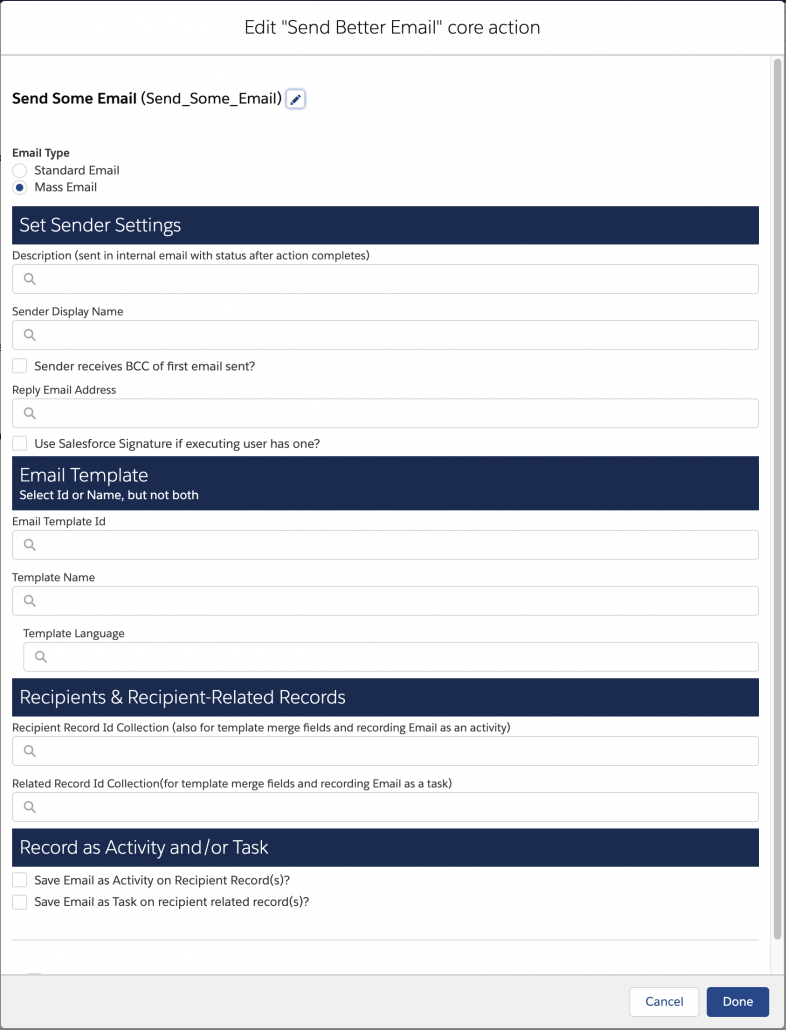
When you set the Email Type to ‘Mass Email’, you get to configure fewer things but you get some monitoring capabilities including the ability to cancel sends and get notified when sending is complete. To begin with, you must use an Email template to specify your email content.
Set Sender Settings
With the following exceptions, these values behave the same as in the Single Email example above.
- Description included in status email
- Organization-wide Addresses are not available

Description (sent in internal email with status after action completes)
When you use Mass Email, a summary report gets sent to the running User upon completion of the sending. The body of this message will include the value specified in the Description input. It is used so the receiver (usually an admin) can distinguish which Action this came from. It should not be confused with the Email Template Description.
Email Template
This section behaves the same as in the Single Email case, described above.
Specifying Recipients
Mass Email requires the use of recipient and related record collections

Recipient Record Id Collection – To specify recipients, pass a collection of Contacts, Leads, or Users to the “Recipient Record Id Collection” input.
Related Record Id Collection – Use this only if you are providing a collection of Contacts for Recipient Record Id Collection. If you use it, it must: 1) match the number of Contacts in umber and 2) be from one of the following: Contract, Case, Opportunity, Product. Essentially, this surfaces additional merge field options in the Template.
Record as Activity and/or Task
When sending a communication, you may wish to keep a record that a communication has been sent. To do so, you can use one or both of the following. Note: Using this feature does require a record access/query which will be counted for limits).
Save Email as Activity on Recipient Record(s)?
If selected, the sent email will be recorded as an Activity on the corresponding Recipient Record (not on the Related Record).
Save Email as Task on recipient related record(s)?
If selected, a Task will be created on the Related Record (not on the Recipient Record).
Output Values
Both Single and Mass Email return values that can be used later in the flow.
errors
A string which reports back the last error encountered in executing the action. In the event a successful send occurs, errors on subsequent events (such as adding a task or email activity) may be reported here, but isSuccess would still return true.
isSuccess
A boolean that indicates the success or failure of this Action in executing the send email. In the event a successful send occurred, errors on subsequent events (such as adding a task or email activity may be reported in the errors), but isSuccess would still be true.
taskIds
If “Save Email as Task on recipient related record(s)?” has been selected, this is a returned list of TaskIds that were successfully created. If an error occurred for the individual task, instead of an ID, it will return a string starting with “ERROR: ” followed by the error message.
templateUsed
In the case where a Template name was used instead of a specific id, this parameter returns the Id of the template actually used. This is useful if the process maintainer wishes to know which language template was used (in the case of language localization) or which template was selected if the org has multiple templates of the same name
Reference
Using Email Templates
This action supports Email Templates . For a nice introduction on how to use email templates, letterheads and even graphics, you may wish to start with the Trailhead: Configure an Email Letterhead and Template.
Use Email Templates to save time and standardize email sent by you or others in your organization. Use merge fields or enhanced letterhead to customize the content and/or appearance of the communication. Details on how to use EmailTemplates in multilingual environments can be found here.
There are 3 core components of an email template:
- The Template. The template contains the format of the email (including Letterhead) and syntax for merging fields into that communication. A merge field is a placeholder in an email template or letterhead. When you send the email, the placeholder is replaced with the Salesforce data from the record or records of the people you are emailing. Fields that can be merged include those from the TargetObject, another sObject record, and global variables. NOTE: the merging done by the template system is different from the merging done by Flow, and there is currently limited ability to pass dynamic values from Flow into the template system. HOWEVER, see this post for an easy technique that will allow you to get full rich dynamic merging.
- The Target Object Record. This is who the email is being sent to, usually a Contact, User, Lead or Group. Depending on the type of template you are using, other fields from this Target Object can also be merged into the template as part of the send email (e.g., Dear Dear {{{Recipient.Name}}}). In email templates, the merge fields for “recipient” come from the specified object Id.
- The Related Record (for Contacts only). If you specify a Contact for the Target Object field, you can specify an optional Related Record to merge fields in the template from that record. For the most predictable results, Use the Handlebars Merge Language in Lightning Email Templates and Enhanced Letterhead which merges fields from the record into the email using the format {{{[Related Record Type].[Field]}}} (e.g., {{{Case.CaseNumber}}}), and convert your Classic Templates to LightningEmailTemplates with Enhanced Letterhead.


Adding Multilingual Email Template Support
SendBetterEmail provides multi-lingual support within the same flow by allowing a set of related email templates to be created in different languages. In the flow, specify the desired language. To make this work, the names of the email templates must follow some rules:
- Each language localization has its own template with all localizations sharing a common EmailTemplate.Name.
- To differentiate the localizations, add the following text to the EmailTemplate’s Description fieldt: ‘Language=”en_US”‘ (or whatever corresponding to your organization localizations).
For more on how to add localization to an email template set, please refer to Send Better Email with Multi-Language Support for Lightning Email Templates.
Bulk Email Using sendBetterEmail
This is a complex, advanced functionality that should be used only when needed. You are much better off using the standard functionality unless you have bulk requests that cannot be satisfied with a SendBetterEmail request.
SendBetterEmail can be used to send bulk email using collections of; 1) Single Email Requests, 2) Mass Email Requests, or 3) a blend of both. Single and Mass email requests can each be individually bulkified (up to the limit for each type), or a Single Email request can be individually customized for each email.
This simplified example just shows how to create a collection of requests using the “Send Better Email Bulk Request Setup”. A collection of requests can be created and then sent as a collection (up to 10 requests of each type [single, mass] in a collection), where each request is:
- a single customized email
- a single email using address collections and/or target (recipient) id collection
- a mass email a using target (recipient) id collection
Bulk email with sendBetterEmail is a three step process:
- Create a collection of requests using the “Send Better Email Bulk Request Setup” Flow Action with the Custom Parameter Editor which will create a SendBetterEmailRequest which can be added to the collection of SendBetterEmailRequest
- Use the “Send Better Email Bulk” Flow Action to send the collection of SendBetterEmailRequests created in step 1
- Loop through the collection of SendBetterEmailResponse returned from the “Send Better Email Bulk” Flow Action for status.
All requests are (of course) subject to organization limits which can be found in the Apex Developer Guide, Execution Governors and Limits, Section on Email Limits – Outbound Email: Limits for Single and Mass Email Sent Using Apex. If templates and/or collections of recipients are used, single email message types are limited to 150 total addresses per request and mass email message types are limited bye the edition. For professional Edition of Salesforce, that’s 250 emails in a single call, or if you are running Enterprise Edition, 500. For Unlimited Edition, you can send 1,000 emails in a single call.
Operational Considerations
This action makes use of the standard Salesforce email infrastructure, the same service that you use when you send a single email directly from a lightning experience page or a classic case feed. As such, any emails you send will be included in your usage, so be aware of the limits and guidelines. (Developer note: this action makes use of the Apex Messaging service API’s.)
This action does not use or involve Email Alerts, which are used in Workflow Rules and exist in Flow as separate actions you can drag into your flow. Be mindful of this so you don’t accidentally confuse the Email Alerts, the Email Templates, and the Flow Text Templates.
Examples
The installed package comes with example flows for illustrative “how-to” on several common functions in the flow “Send Better Email Testflow”
Flow Examples in Send Better Email Testflow (Send_Better_Email_Testflow)
- Simple Email Text – with To, Sender, Reply-To, Subject, Body (All text)
- Simple Email with Address Collections – Using Address Collections to Send to Multiple Recipients
- Email with Attachments – Simple Email (1) With Attachments
- Email Using Template – An email using a Lightning EmailTemplate
- Multi-Lingual Using Email Templates – An email using a Lightning EmailTemplate selected by language
- Mass Email – Send an email using MassEmail messaging
- Bulk Email – Send bulk email using request collections
Troubleshooting
Problem Statement: Apex Test Class SendBetterEmailTest fails for test cases t001 with error message System.AssertException: Assertion Failed: emailDeliverabilityEnabled and capacity exceeded: Expected: true, Actual: false
Stack Trace: Class.SendBetterEmailTest.t001_canSendEmail: line 240, column 1
This happens even when the email deliverability is ‘All Emails’ In the orgResolution: Turn Off the Email Bounce Management in the org as the email address utilized in test classes are invalid and due to bounce management requires to be validated. If bounce management cannot be turned off then change the email address utilized in the test classes to one of the valid email address.
Credits
MVP Jeremiah Dohn pioneered this space several years back with his well received HTML Email Flow action. The version here is similar and adds a several of additional capabilities.
Jack Pond added a great deal of functionality and a custom property editor.
Related Actions
Get Group Info: User Emails and More
Installation
Prerequisites
Before installing this component you need to have in your org the Flow Actions Base Pack and the Flow Screen Components Base Pack. Install them here.
If you are having trouble updating/upgrading the component, read this.
V3.2 1/12/23 Production Sandbox – PMD Support for easier
Old versions
V3.1 12/23/22 Production Sandbox – Bug fixes
3.0.1 Unlocked (production) 4/20/22 – Compatible with V3 of the Base Packs.
3.0.1 Unlocked (sandbox) 4/20/22
3.0.0 Unlocked (production) 4/17/22 – Compatible with V3 of the Base Packs.
3.0.0 Unlocked (sandbox) 4/17/22
2.2.1 Unlocked(ver 2.2.1) 10/17/2021 Bugfix release . Fix: #925 (fixes Mass Email Issues), removed duplicate context entries in CPE, Fix: #900, and Attachments are not visible in Activity EmailMessage #887. Make sure you update Flow Actions Base Pack and the Flow Screen Components Base Pack before applying this update.
2.2 Unlocked (Ver 2.1.7) 08/31/2021 Scheduled release. Enhancements and improvements; #855 allow installation when enhanced email not enabled and , #862 add to Category “Email” in new action insert. Make sure you update Flow Actions Base Pack and the Flow Screen Components Base Pack before applying this update.
2.1.6 Unlocked 08/08/2021 Bugfix release. Fixes several checkbox issues, sending multiple versions of attachments, and various save as activity and tasks issues. #702, #831, #785, #823 #829, #581. Make sure you update Flow Actions Base Pack and the Flow Screen Components Base Pack before applying this update.
2.1.5 Unlocked 6/29/21 Temporary fix for bug 786 -Too Many SOQL Queries error from “cache” email templates
2.1.3 Unlocked 6/19/21 fixes bug 702
2.1.2 Unlocked 4-14-2021 Fixes Attachment Bug
This release depends on the both flow basepacks – minimum version of FlowActionsBasePack Version 2.12 Managed and FlowScreenComponentsBasePack Version 2.1.6 Unlocked which must be installed/upgraded prior.
Includes two new features, Treat Target Object As Recipient and In Reply To and fixes various bugs including attachment naming and using templates without description information.
USAGE NOTE: After Version 2.0.4, Use Salesforce Signature defaults to false. Previously it defaulted to true. That means that if you did not set it at all in your previous use of Send Better Email, your emails added your Salesforce Signature but now will stop doing that unless you explicitly set this to true
2.0.4 Unlocked 11-29. Bug fixes for lwclogger conflict and broken attachments
2.0.1 Unlocked sendBetterEmail The first full Custom Property Editor version that supports both singleEmail and massEmail and has several fixes.
Note: Versions prior to v1.33.2 use this documentation.
- 1.33.2 Unmanaged sendHTMLEmail (with Flow Examples/Tests) – Major upgrade that includes several enhancements and bug fixes. Parameters are now selected using a Custom Property Editor. Additionally, mass email messaging has been included.
- 1.33.1 Unmanaged sendHTMLEmail (with Flow Examples/Tests) – Minor update Addresses issues #308 and #316 to fill in Task Comments and Recipients and improved documentation.
- 1.33.1 Unmanaged sendHTMLEmail(Without Examples) – Core Component without Examples/Flow Testing (Added documentation, validations)
- 1.33 Unmanaged sendHTMLEmail (with Flow Examples/Tests) – Added documentation, validations, examples)
- 1.33 Unmanaged sendHTMLEmail(No Tests) – No Flow tests or examples (Added documentation, validations)
- 1.32 Unmanaged – Adds Bulkification1.31 Unmanaged
- 1.2 Unmanaged (attachments are supported using Attachments instead of Content Document Links)
- 1.0 Unmanaged
- 1.0 – Managed (requires Winter ’20)


